A furniture maker cutting a panel on a bandsaw under a work light
Built inside a working Cape Town upholstery factory

Know where every couch is, what it cost and when it ships.

Orders, the factory floor, costing, wages, dispatch, invoicing and your showroom till, in one app that works on any phone, tablet or computer.

R 2 999 a month, everything included. No card, no sales call, no setup fee.

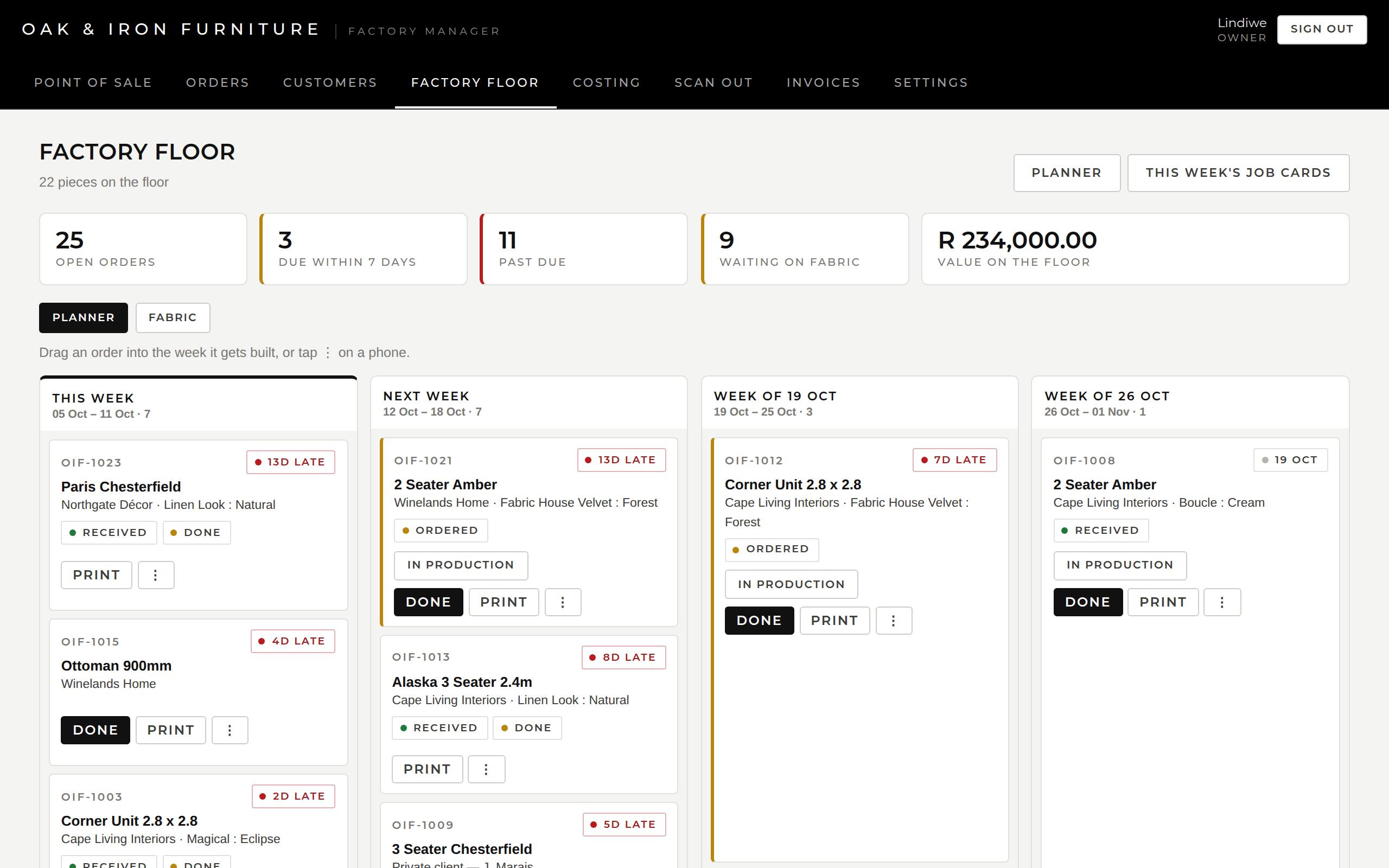
The factory floor: four weeks of orders, what is late and what is waiting on fabric
On the factory floor

From frame to front door.

A couch passes through a lot of hands before it leaves. Factory Manager follows it through every one, so everyone knows what to build next and nothing goes out late or unbilled.

A craftsman cutting a board at his workbench
01

Cutting

Job cards with the spec and due date, each with a QR code.

A machinist sewing fabric in a busy sewing room
02

Sewing

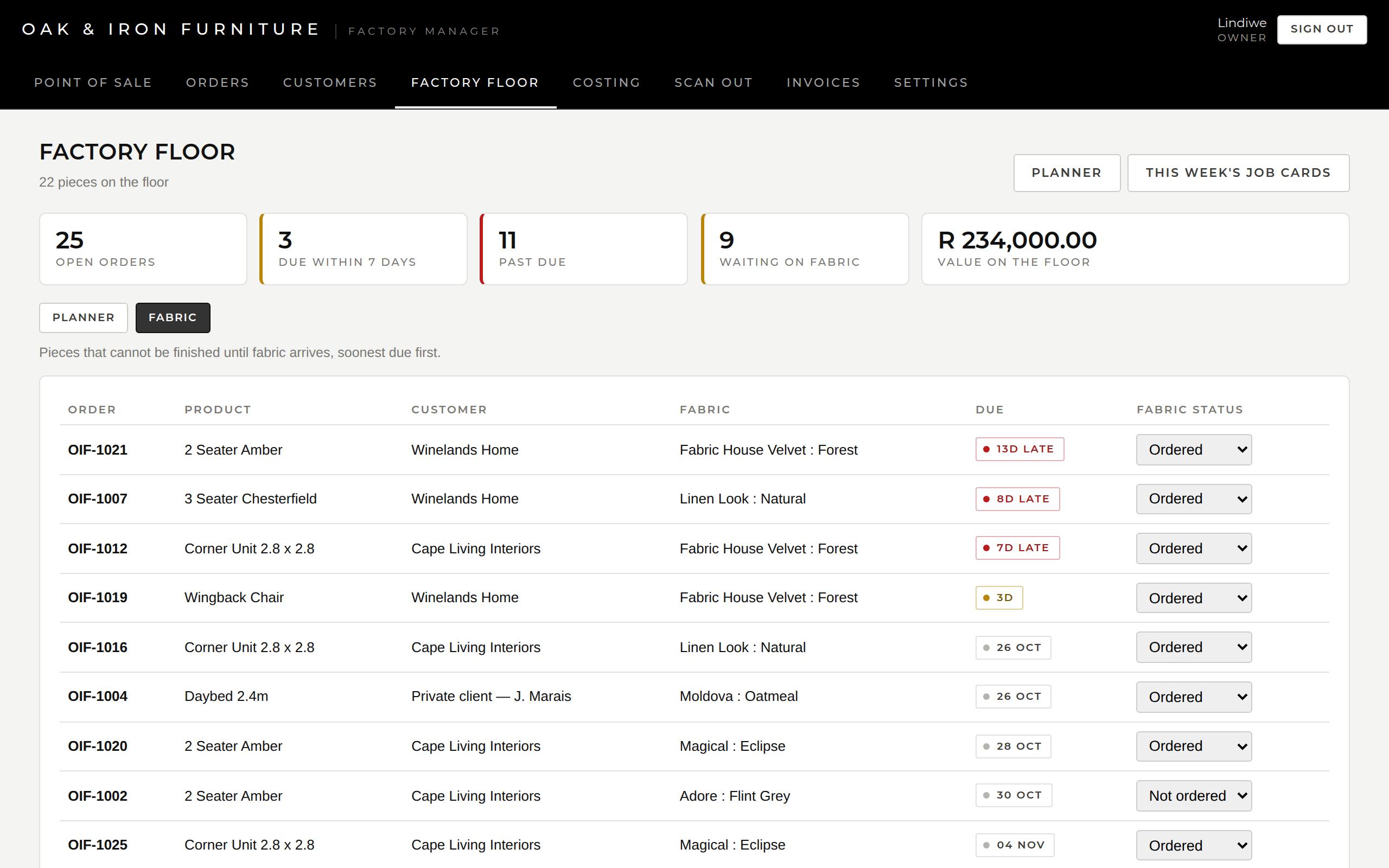
The fabric list shows what is in and what is still waiting.

An upholsterer working on a buttoned couch with a hammer
03

Upholstering

One tap marks a piece in production or done.

Two workers boxing a finished chair for delivery
04

Dispatch

Scan it at the door and the customer hears it is on its way.

What it does

Everything between the order and the invoice.

Built with working South African furniture makers, for the way an upholstery and furniture factory actually runs.

Orders

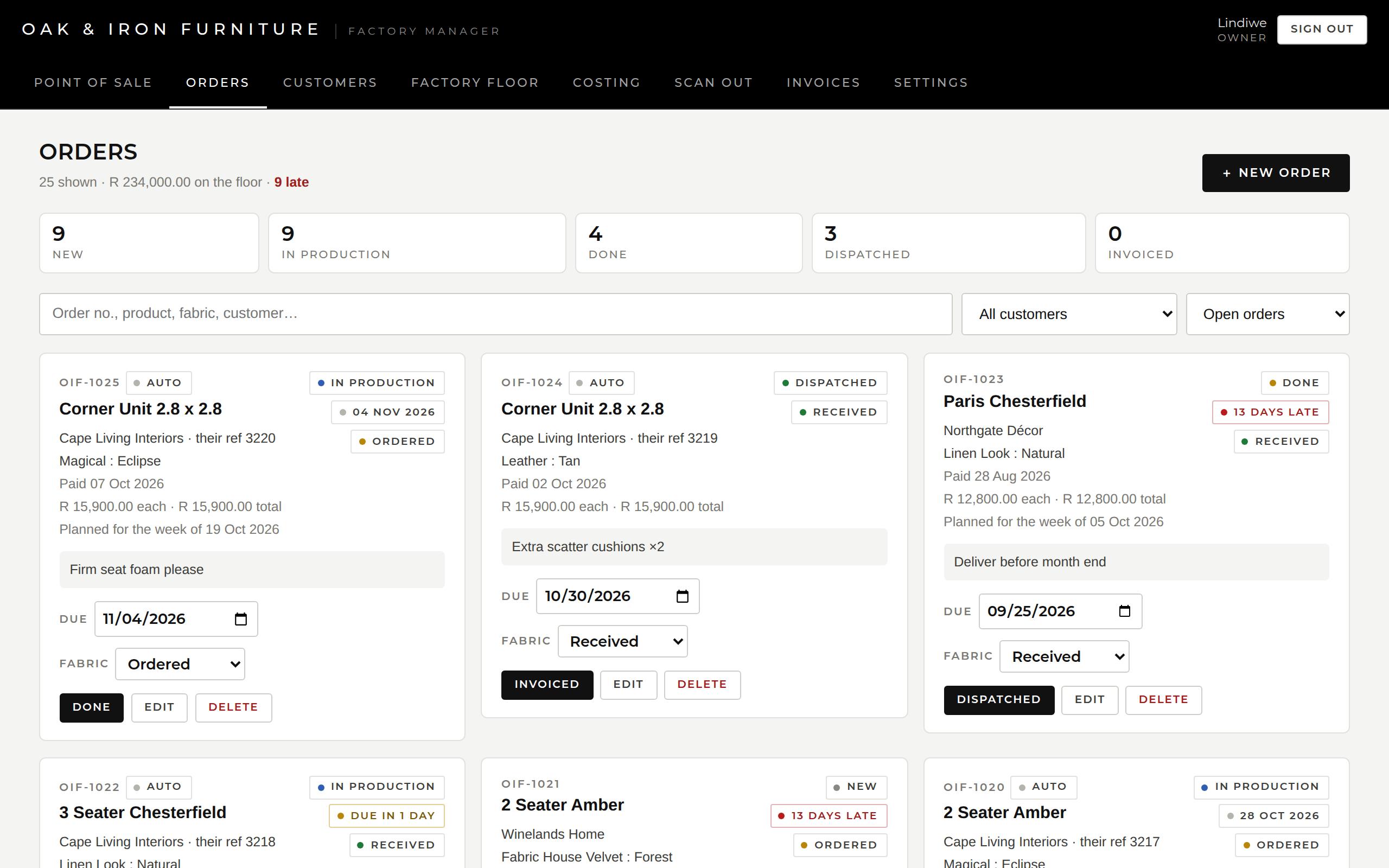
Every order, where it is and when it is due.

Capture an order once and follow it from new to dispatched. Nothing gets lost between the showroom, the office and the floor.

  • Your own order numbers, with each customer's reference kept alongside
  • Due dates, late warnings and a fabric status on every order
  • A history on each order of who changed what, and when
  • Two people can work at the same time without overwriting each other
Orders: every order with its status, fabric, due date and customer
Factory floor

Plan the weeks ahead, print the job cards.

A four-week planner shows what is being built when. Drag an order into the week it gets built, or tap it on a phone.

  • Open, due-this-week, late and waiting-on-fabric at a glance
  • A fabric list of everything still to order or receive
  • Printable job cards, each with a QR code for scanning out
  • One tap marks a piece in production or done
The fabric list: pieces waiting on fabric, soonest due first
Costing

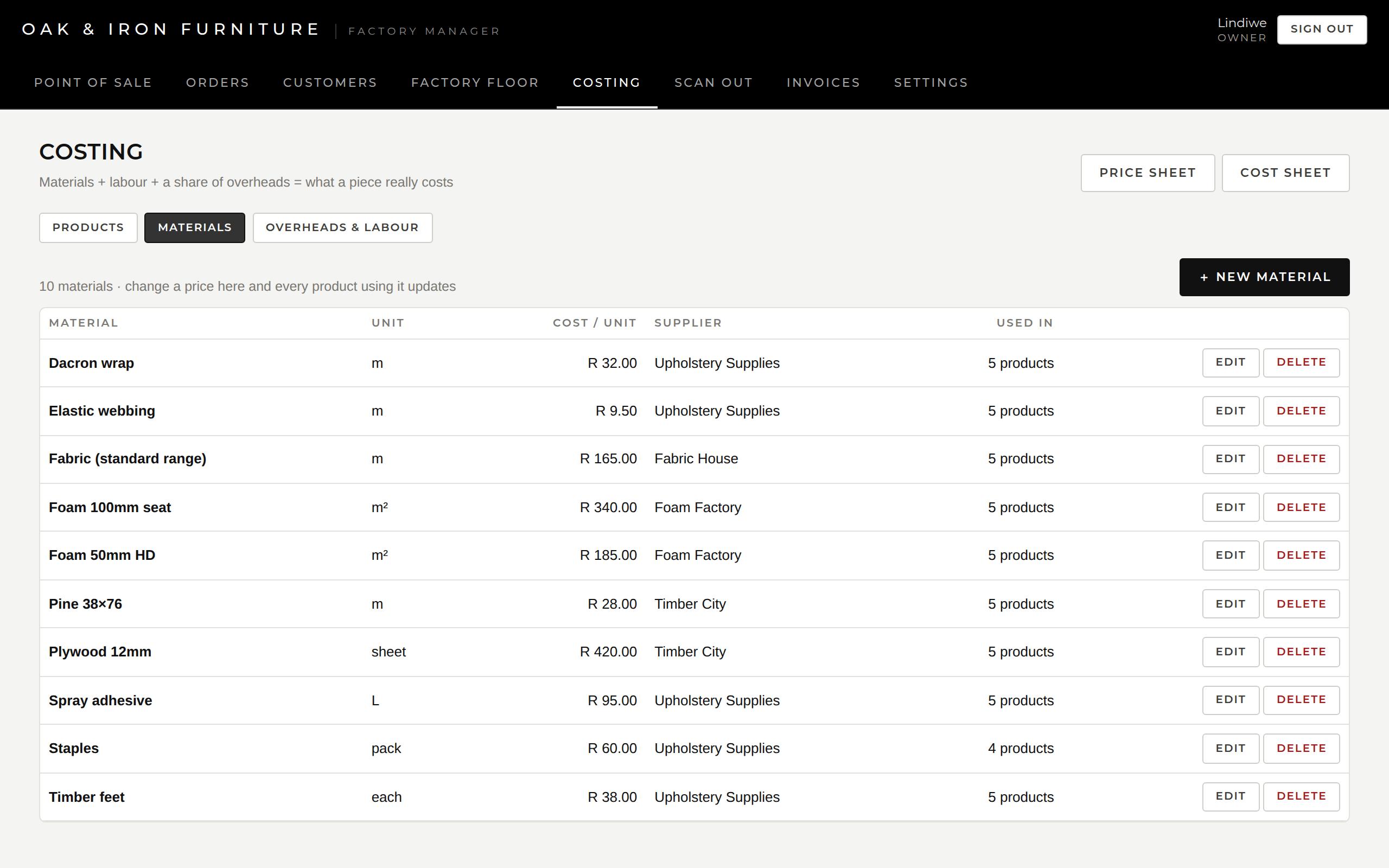
Know what a couch really costs you.

Materials, labour and a fair share of your overheads add up to the true cost of each piece, and the margin you make on it.

  • A materials list with current prices; change one and every product updates
  • A bill of materials and labour hours per product
  • Rent, wages and running costs spread across what you make each month
  • A printable price list for customers and a cost sheet for you
Costing: materials with prices and suppliers
Showroom till

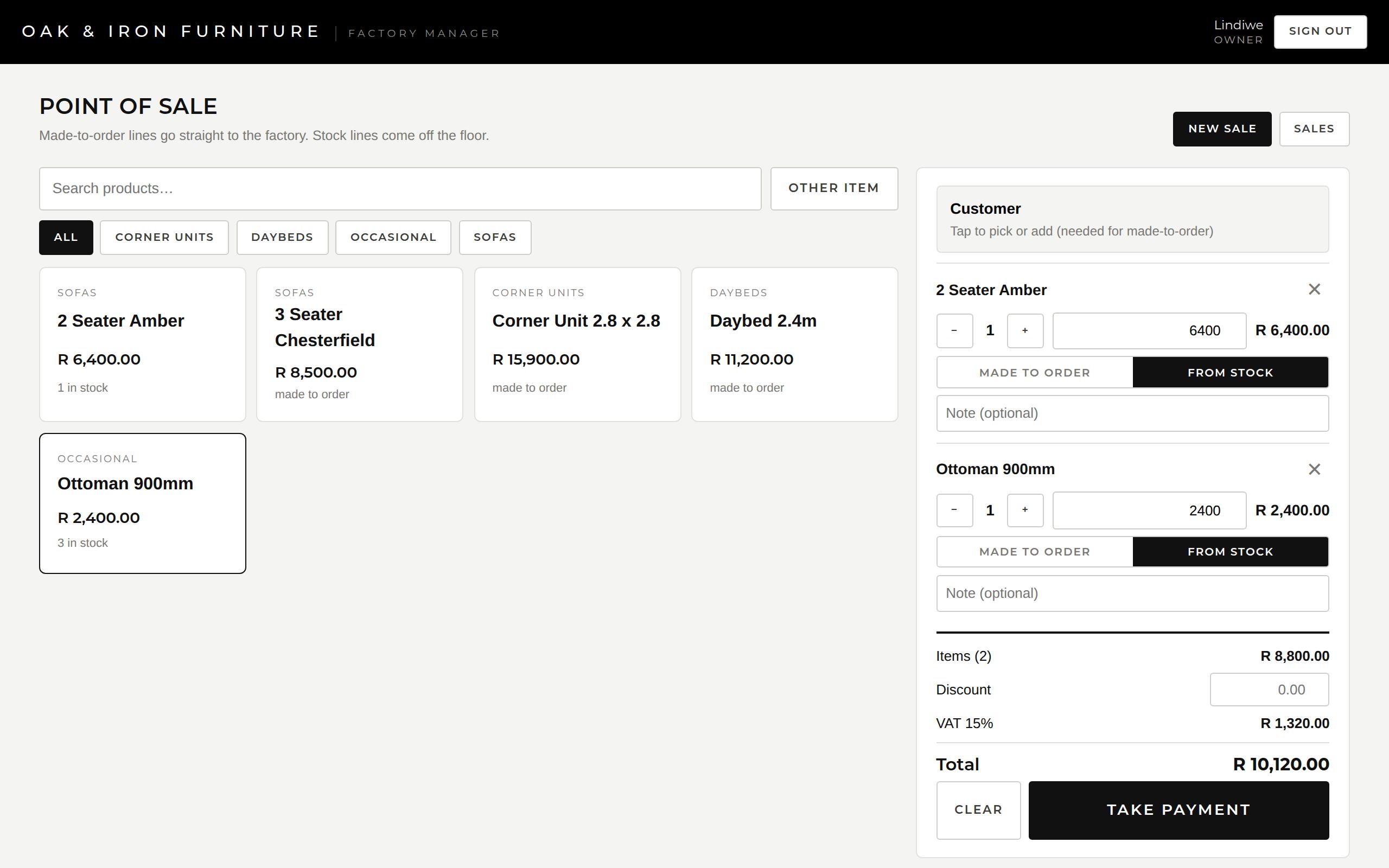
Sell from the floor or to order, in one sale.

A point of sale for the tablet at the counter, using the same products and prices as the factory.

  • Made-to-order lines go straight to the factory as orders
  • From-stock lines take the piece off your showroom count
  • Every sale raises an invoice with the payment already on it
  • Discounts and VAT worked out for you
The showroom till with products and a basket
Scan out

Scan it at the door. The customer hears about it.

Point any phone at the QR code on the job card as a piece leaves. It is marked dispatched, with who and when.

  • Works with the phone's own camera; no scanner to buy
  • One tap sends the customer a WhatsApp or email that it is on its way
  • Dispatched pieces queue up for invoicing so nothing goes unbilled
Scan out on a phone
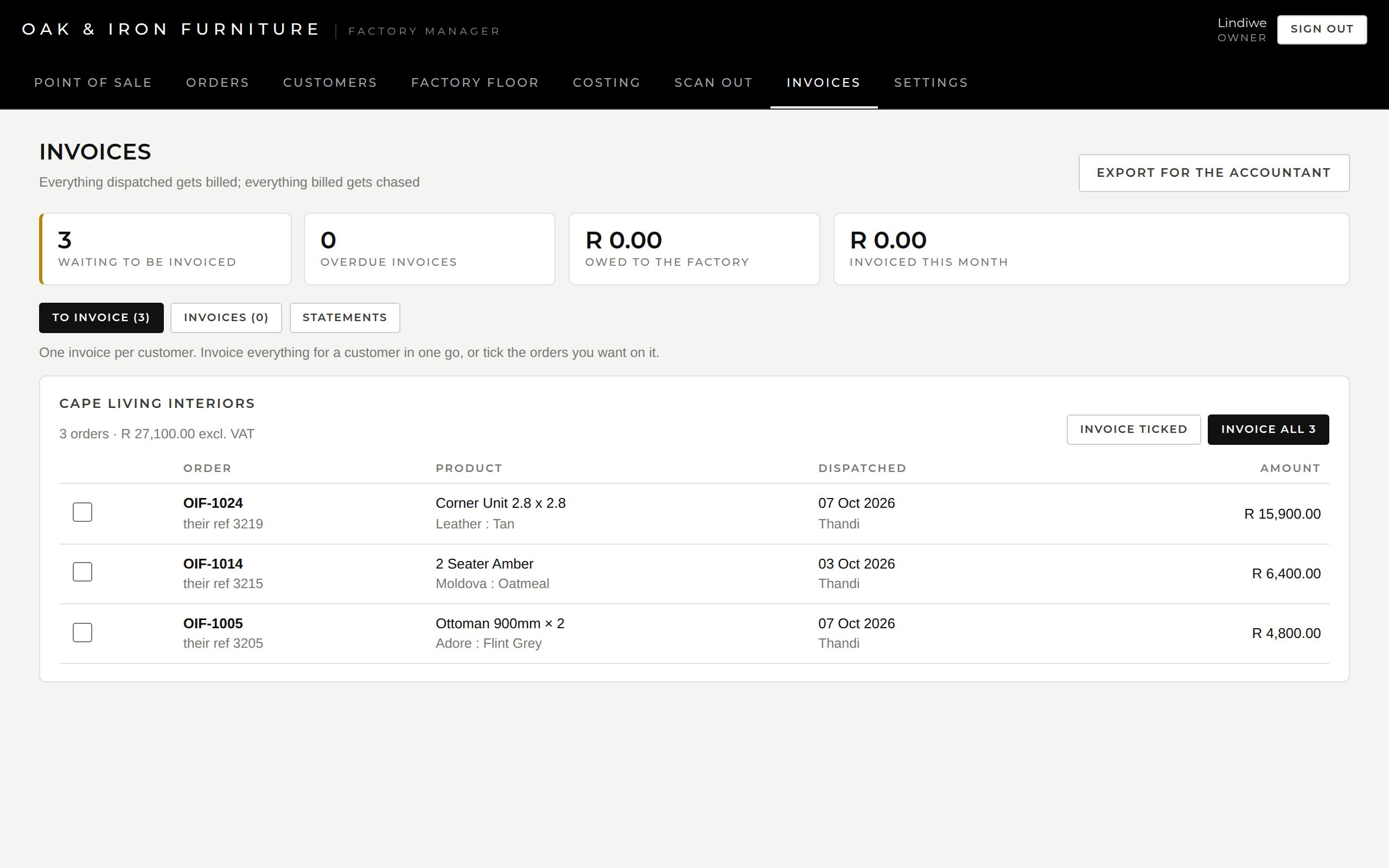
Invoicing

Everything dispatched gets billed.

Invoices in your name and numbering, with your bank details and VAT when you are registered.

  • Invoice all of a customer's dispatched orders in one go
  • Record payments and see who owes what
  • Statements per customer
  • An export of every invoice line for your accountant
Invoices waiting to be raised
Works with what you already use

Keep your accountant, your shop and your WhatsApp.

Factory Manager runs the floor and the money that comes in. It hands the rest to the tools you already pay for.

Xero

Sales go to your books

Till sales paid in full go to Xero by themselves, as paid invoices. Every invoice line exports for your accountant.

Shopify

Online orders hit the floor

Orders from your Shopify shop come in as factory orders, with the fabric and the delivery address.

WhatsApp

Send it where people read it

Quotes, purchase orders, the driver's run and "it's on its way" all go out on WhatsApp.

Excel

Start from your spreadsheets

Bring in your materials, products, costings and customers from the Excel or CSV files you already have.

For the whole team

Everyone sees what they need, nothing more.

The office, the showroom and the floor work from the same orders, on whatever screen is closest: a laptop on the bench, a tablet at the counter or a phone in a pocket.

A furniture maker checking his laptop at the workbench, tools and a drill press behind him

Roles

Owner, office, sales and factory floor. The factory sees the planner and scan out; the till sees sales.

Invite by WhatsApp

Add someone's email and send them the sign-up link. They are in, with the right role, in a minute.

Nothing to install

It runs in the browser on any phone, tablet or computer, at the office, on the floor or at home.

Your data stays yours

Your records are kept apart from every other business on the app. Nobody else can see them.

Getting started

Working by this afternoon.

Start your trial

Your company name, your name, email and a password. You are the owner, with 14 days free.

Add your products

Put in your materials and products once. Costing, the till and the price list all work from them.

Invite your team

Send the office, the till and the factory floor their links, and start capturing orders.

Pricing

One plan. Everything included.

No per-user fees and no limits on orders. Try it free for 14 days, then pay monthly. Cancel whenever you like.

  • No setup fee, no consultants, no contract
  • No demo to book: start the trial or click through the live demo yourself
  • Download all your data any time, in one file
  • The same price with two people or twenty
Standard
R 2 999
per month
  • Orders, factory floor, costing, wages, scan out, invoicing and the till
  • Your whole team, with roles
  • Unlimited orders, customers and products
  • 14 days free before you pay anything
Start free trial

Paid monthly through PayFast by card or instant EFT.

Also from us

Factory Manager POS. The till for your shop.

A point of sale for showrooms and retail shops, on its own: you do not need Factory Manager to use it. Registers and cash-ups, lay-bys, returns, custom orders, stock, purchase orders, Shopify and Xero.

  • Staff sign in with a PIN on each till; managers approve discounts with theirs
  • Works through a power or internet cut and catches up after
  • Make furniture too? Link it to Factory Manager and send custom orders to the factory when you choose
  • Its own sign-up, its own price, its own 14-day free trial
Factory Manager POS
R 999
per month
  • One business: every company, store, till and person
  • Tax invoices, lay-bys and cash-ups that add up
  • 14 days free before you pay anything
Start POS free trial

Already using it? Sign in to the POS. Paid monthly through PayFast.

Questions

Good to know.

Do I need a card to start the trial?

No. Sign up with your company name, email and a password. You only pay if you decide to carry on after 14 days.

Do I have to book a demo or talk to sales?

No. Click Try the demo to use it with sample orders, or start the free trial on your own orders. Nobody will call you unless you ask.

Does it do wages?

Yes. Weekly or monthly wage runs for hourly, weekly, piece-work and salaried staff, with piece-work taken from the job cards finished that week, payslips, UIF and an export for your accountant or payroll service. PAYE is left to them, because the tax tables change every year.

Does it work with my accounting?

If you use Xero, connect it under Settings and paid till sales go across by themselves. Whatever you use, every invoice line exports to Excel for your accountant.

What happens when the trial ends?

If you have not subscribed, the app becomes read only. You and your team can still sign in and see everything you captured, but you cannot add or change anything until you subscribe. Nothing is deleted.

How do I pay?

Monthly, through PayFast, by card or instant EFT. The owner subscribes under Settings, Billing, and PayFast takes the payment each month.

Can I cancel?

Yes, any time, under Settings, Billing. No more payments are taken, and you keep full use until the end of the month you have paid for.

Who can see my data?

Only the people you invite. Each business is kept separate in the database itself, so no other company on the app can see your orders, customers, prices or costs. You can download all of it in one file whenever you like.

Does it work on a phone?

Yes. It runs in the browser on any phone, tablet or computer, with nothing to install. The till is made for a tablet at the counter, and scan out uses the phone's own camera.

How many people can use it?

As many as you need. The price is the same whether you have two people or twenty.

Built on a factory floor. Ready for yours today.

Start the 14-day free trial now. No card, no sales call, and your team can be working by this afternoon.

Start your free trial